cai.zhangandClaude Fable 5.1
e4e6e1a00f
cai.zhangandClaude Fable 5.1
e4e6e1a00f
issue: #54138
pr: #54294

Backport of #54294 to `3.0`.

`ST_DWITHIN` on a segment with an `RTREE` index returned fewer rows than
the same filter on the raw (un-indexed) path. Two independent defects,
both present on this branch (the issue was reported against v2.6.22):

**1. Empty geometries matched on the raw path only.**
`Geometry::dwithin` accepted every empty row (`POINT EMPTY`, `POLYGON
EMPTY`, ...) at any distance, because GEOS reports a distance of 0 to an
empty geometry. The R-Tree stores a placeholder MBR for such rows (older
builders stored garbage), so no query envelope away from it ever
surfaced them as candidates. Raw path: returned. Indexed path: not
returned.

Fix: `dwithin` returns `false` when either operand is empty, matching
PostGIS `ST_DWithin`. This makes both paths agree for every archive,
whatever envelope an older index builder recorded for empty rows, with
no index rebuild. The placeholder-MBR note in `RTreeIndexWrapper` now
states this as the contract it is.

**2. The coarse envelope was not a superset of the exact predicate.**
`create_bounding_box_for_dwithin` used a fixed 111320 m/deg box with
longitude divided by `cos(lat)`. The exact predicate measures with two
other metrics: haversine (R = 6371000, ~111195 m/deg) for point rows,
and planar GEOS degrees scaled by `111320 * sqrt((1 + cos²lat) / 2)` for
every other shape. At lat 35 the scaled metric accepts non-point rows up
to 4.91 deg north while the box stopped at 4.49 deg; point rows were cut
off by ~0.1 %. Rows in that band were pruned before refinement.

Fix: new `Geometry::DWithinSearchEnvelope` derives the envelope from the
same constants `dwithin` uses: the spherical cap of the haversine metric
unioned with the planar disc of the scaled metric, full longitude when
the cap contains a pole, plus a rounding margin applied to the inputs of
the pole tests and of the longitude `asin` (asin has infinite slope at
1, so a margin added afterwards can still stop short of a row sitting
exactly on the pole; this is the review fix from the master PR). A cap
that crosses the antimeridian does not widen to every longitude:
haversine wraps longitude modulo 360 but the planar metric does not, so
the search region is the unclamped primary box (which still covers the
planar disc) plus a second box at the opposite edge covering only the
cap's overflow. This branch queries the index once per box and ORs the
candidate bitmaps; if two answers differ in length the shorter is kept,
so a short index is still detected and fully refined (review fix from
the master PR: `POINT (179.999 0)` with 1000 m previously refined the
whole latitude band). The WKT handed to the index is printed with fmt's
shortest round-trip representation instead of 6 fixed decimals. An empty
query point hands the index an empty geometry, which this branch's
wrapper answers with zero candidates for every predicate except
`ST_Equals`, consistent with the predicate.

**Tests** (same cases as master, relocated because this branch predates
#53585)
- `GeometryTest`: empty operands are `false` for all five empty types on
either side; the reporter's three missed points plus a polygon/line in
the 4.49..4.91 deg band; a sampled superset property over 8 query points
× 16 bearings × 6 radial scales for points, lines and polygons; pole /
antimeridian / empty-query / negative-distance edge cases, plus the
exact-pole distance at both poles; antimeridian cases on both sides of
±180, exactly on it and with an out-of-range query longitude.
- `RTreeIndexTest.GIS_DWithin_IndexPathMatchesRawPath`: one geometry
column (clusters, five interior empty rows of different types, the
boundary rows, far rows, a row on the south pole) loaded into two sealed
segments, R-Tree built and installed on one of them; eight `ST_DWITHIN`
queries (including an empty query point and the exact-pole distance)
must produce identical bitsets on both segments; antimeridian rows on
both sides of ±180 plus an antipodal row at the same latitude, queried
from `POINT (179.999 0)` and `POINT (-179.999 0)` with 1000 m.

Differences from the master commits: the regression test lives in
`RTreeIndexTest.cpp` instead of `GISIndexRefinementTest.cpp`, and the
contract note is in `RTreeIndexWrapper.cpp` instead of
`RTreeEngine.cpp`; the source change is otherwise identical. Not
compiled locally; CI is the verification.

🤖 Generated with [Claude Code](https://claude.com/claude-code)

---------

Signed-off-by: cai.zhang <cai.zhang@zilliz.com>
Co-authored-by: Claude Fable 5.1 <noreply@anthropic.com>








What is Milvus?
🐦 Milvus is a high-performance vector database built for scale. It powers AI applications by efficiently organizing and searching vast amounts of unstructured data, such as text, images, and multi-modal information.
🧑💻 Written in Go and C++, Milvus implements hardware acceleration for CPU/GPU to achieve best-in-class vector search performance. Thanks to its fully-distributed and K8s-native architecture, Milvus can scale horizontally, handle tens of thousands of search queries on billions of vectors, and keep data fresh with real-time streaming updates. Milvus also supports Standalone mode for single machine deployment. Milvus Lite is a lightweight version good for quickstart in python with pip install.
Want to use Milvus with zero setup? Try out Zilliz Cloud ☁️ for free. Milvus is available as a fully managed service on Zilliz Cloud, with Serverless, Dedicated and BYOC options available.
For questions about how to use Milvus, join the community on Discord to get help. For reporting problems, file bugs and feature requests in GitHub Issues or ask in Discussions.
The Milvus open-source project is under LF AI & Data Foundation, distributed with Apache 2.0 License, with Zilliz as its major contributor.
Quickstart
$ pip install -U pymilvus
This installs pymilvus, the Python SDK for Milvus. Use MilvusClient to create a client:
from pymilvus import MilvusClient
-
You can also try Milvus Lite for quickstart by installing
pymilvus[milvus-lite]. To create a local vector database, simply instantiate a client with a local file name for persisting data:client = MilvusClient("milvus_demo.db") -
You can also specify the credentials to connect to your deployed Milvus server or Zilliz Cloud:
client = MilvusClient(
  uri="<endpoint_of_self_hosted_milvus_or_zilliz_cloud>",
  token="<username_and_password_or_zilliz_cloud_api_key>")
With the client, you can create collection:
client.create_collection(
    collection_name="demo_collection",
    dimension=768,  # The vectors we will use in this demo have 768 dimensions
)
Ingest data:
res = client.insert(collection_name="demo_collection", data=data)
Perform vector search:
query_vectors = embedding_fn.encode_queries(["Who is Alan Turing?", "What is AI?"])
res = client.search(
    collection_name="demo_collection",  # target collection
    data=query_vectors,  # a list of one or more query vectors, supports batch
    limit=2,  # how many results to return (topK)
    output_fields=["vector", "text", "subject"],  # what fields to return
)
Why Milvus
Milvus is designed to handle vector search at scale. It stores vectors, which are learned representations of unstructured data, together with other scalar data types such as integers, strings, and JSON objects. Users can conduct efficient vector search with metadata filtering or hybrid search. Here are why developers choose Milvus as the vector database for AI applications:
High Performance at Scale and High Availability
- Milvus features a distributed architecture that separates compute and storage. Milvus can horizontally scale and adapt to diverse traffic patterns, achieving optimal performance by independently increasing query nodes for read-heavy workload and data node for write-heavy workload. The stateless microservices on K8s allow quick recovery from failure, ensuring high availability. The support for replicas further enhances fault tolerance and throughput by loading data segments on multiple query nodes. See benchmark for performance comparison.
Support for Various Vector Index Types and Hardware Acceleration
- Milvus separates the system and core vector search engine, allowing it to support all major vector index types that are optimized for different scenarios, including HNSW, IVF, FLAT (brute-force), SCANN, and DiskANN, with quantization-based variations and mmap. Milvus optimizes vector search for advanced features such as metadata filtering and range search. Additionally, Milvus implements hardware acceleration to enhance vector search performance and supports GPU indexing, such as NVIDIA's CAGRA.
Flexible Multi-tenancy and Hot/Cold Storage
- Milvus supports multi-tenancy through isolation at database, collection, partition, or partition key level. The flexible strategies allow a single cluster to handle hundreds to millions of tenants, also ensures optimized search performance and flexible access control. Milvus enhances cost-effectiveness with hot/cold storage. Frequently accessed hot data can be stored in memory or on SSDs for better performance, while less-accessed cold data is kept on slower, cost-effective storage. This mechanism can significantly reduce costs while maintaining high performance for critical tasks.
Sparse Vector for Full Text Search and Hybrid Search
- In addition to semantic search through dense vector, Milvus also natively supports full text search with BM25 as well as learned sparse embeddings such as SPLADE and BGE-M3. Users can store sparse vectors and dense vectors in the same collection, and define functions to rerank results from multiple search requests. See examples of Hybrid Search with semantic search + full text search.
Data Security and Fine-grain Access Control
- Milvus ensures data security by implementing mandatory user authentication, TLS encryption, and Role-Based Access Control (RBAC). User authentication ensures that only authorized users with valid credentials can access the database, while TLS encryption secures all communications within the network. Additionally, RBAC allows for fine-grained access control by assigning specific permissions to users based on their roles. These features make Milvus a robust and secure choice for enterprise applications, protecting sensitive data from unauthorized access and potential breaches.
Milvus is trusted by AI developers to build applications such as text and image search, Retrieval-Augmented Generation (RAG), and recommendation systems. Milvus powers many mission-critical businesses for startups and enterprises.
Demos and Tutorials
Here is a selection of demos and tutorials to show how to build various types of AI applications made with Milvus:
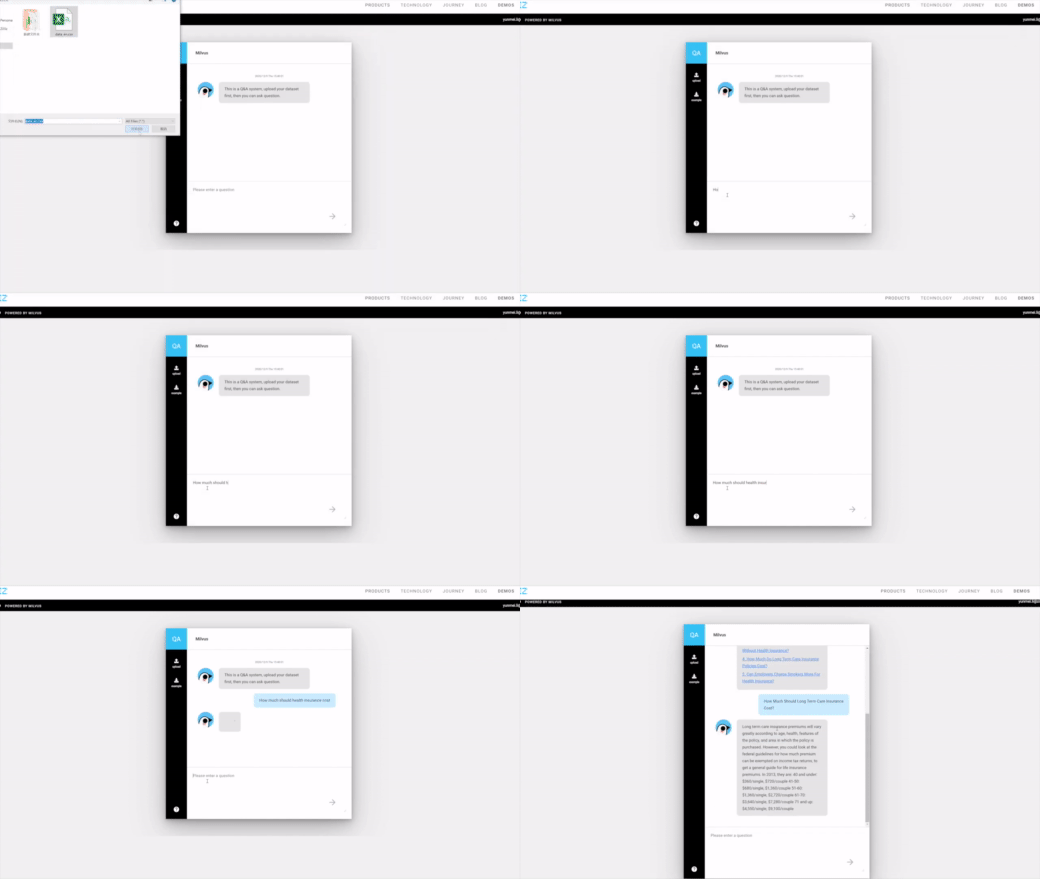
You can explore a comprehensive Tutorials Overview covering topics such as Retrieval-Augmented Generation (RAG), Semantic Search, Hybrid Search, Question Answering, Recommendation Systems, and various quick-start guides. These resources are designed to help you get started quickly and efficiently.
| Tutorial | Use Case | Related Milvus Features |
|---|---|---|
| Build RAG with Milvus | RAG | vector search |
| Advanced RAG Optimizations | RAG | vector search, full text search |
| Full Text Search with Milvus | Text Search | full text search |
| Hybrid Search with Milvus | Hybrid Search | hybrid search, multi vector, dense embedding, sparse embedding |
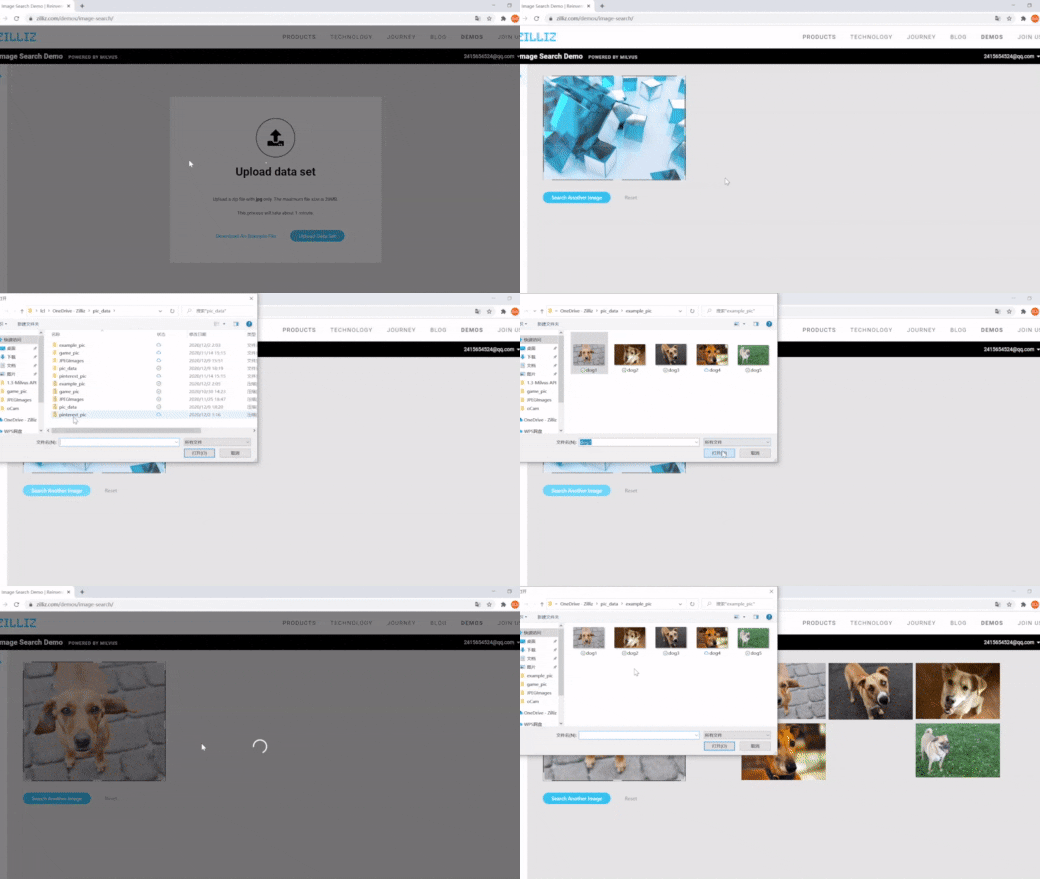
| Image Search with Milvus | Semantic Search | vector search, dynamic field |
| Multimodal Search using Multi Vectors | Semantic Search | multi vector, hybrid search |
| Movie Recommendation with Milvus | Recommendation System | vector search |
| Graph RAG with Milvus | RAG | graph search |
| Contextual Retrieval with Milvus | Quickstart | vector search |
| Vector Visualization | Quickstart | vector search |
| HDBSCAN Clustering with Milvus | Quickstart | vector search |
| Use ColPali for Multi-Modal Retrieval with Milvus | Quickstart | vector search |
|
|
|
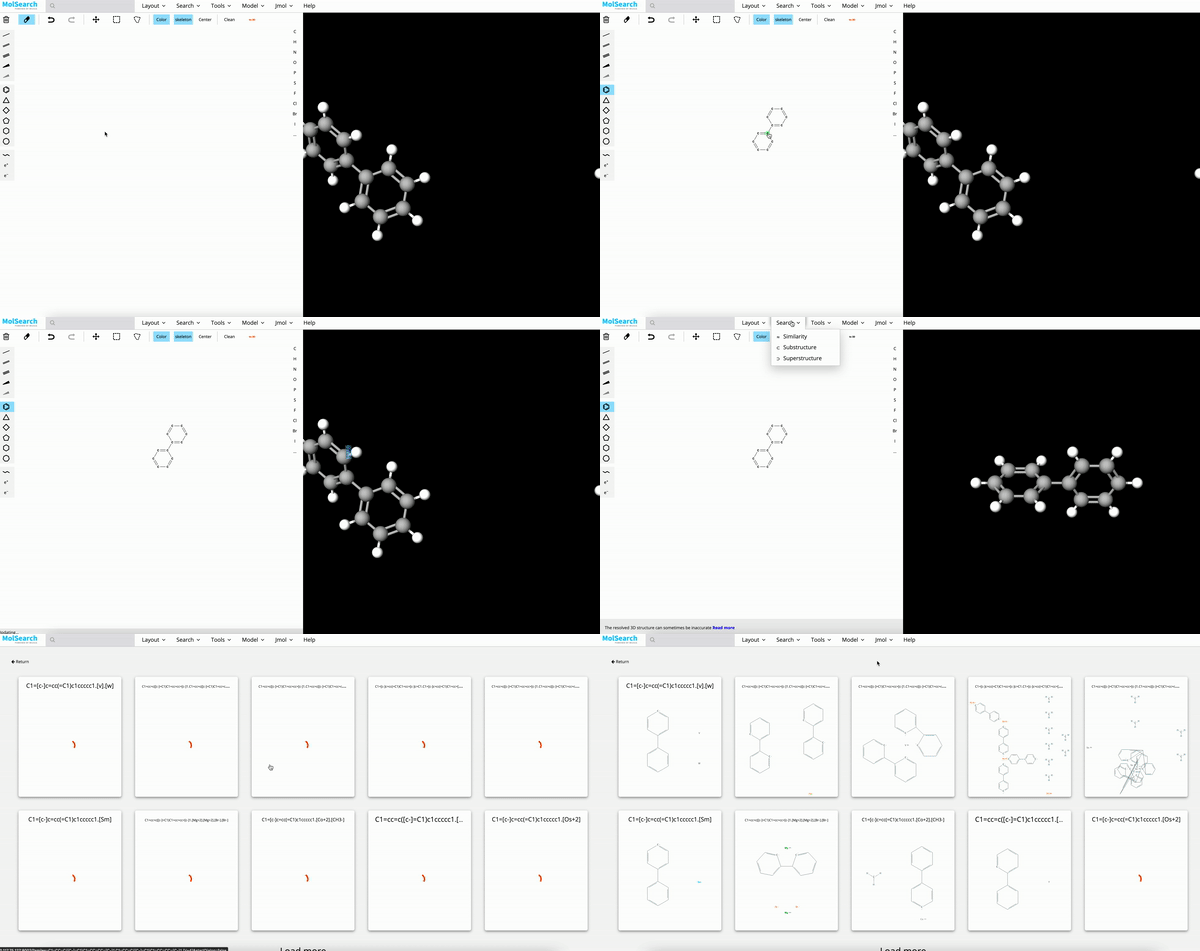
| Image Search | RAG | Drug Discovery |
|---|
Ecosystem and Integration
Milvus integrates with a comprehensive suite of AI development tools, such as LangChain, LlamaIndex, OpenAI and HuggingFace, making it an ideal vector store for GenAI applications such as Retrieval-Augmented Generation (RAG). Milvus works with both open-source embedding models and embedding services, in text, image and video modalities. Milvus also provides a convenient utility pymilvus[model], users can use the simple wrapper code to transform unstructured data into vector embeddings and leverage reranking models for optimized search results. The Milvus ecosystem also includes Attu for GUI-based administration, Birdwatcher for system debugging, Prometheus/Grafana for monitoring, Milvus CDC for data synchronization, VTS for data migration and data connectors for Spark, Kafka, Fivetran, and Airbyte to build search pipelines.
Check out https://milvus.io/docs/integrations_overview.md for more details.
Documentation
For guidance on installation, usage, deployment, and administration, check out Milvus Docs. For technical milestones and enhancement proposals, check out issues on GitHub.
Contributing
The Milvus open-source project accepts contributions from everyone. See Guidelines for Contributing for details on submitting patches and the development workflow. See our community repository to learn about project governance and access more community resources.
Build Milvus from Source Code
Requirements:
-
Linux systems (Ubuntu 20.04 or later recommended):
Go: >= 1.21 CMake: >= 3.26.4 && CMake < 4 GCC: >= 11 Python: > 3.8 and <= 3.11 -
MacOS systems with x86_64 (Big Sur 11.5 or later recommended):
Go: >= 1.21 CMake: >= 3.26.4 && CMake < 4 llvm: >= 15 Python: > 3.8 and <= 3.11 -
MacOS systems with Apple Silicon (Monterey 12.0.1 or later recommended):
Go: >= 1.21 (Arch=ARM64)
CMake: >= 3.26.4 && CMake < 4
llvm: >= 15
Python: > 3.8 and  <= 3.11
Clone Milvus repo and build.
# Clone github repository.
$ git clone https://github.com/milvus-io/milvus.git

# Install third-party dependencies.
$ cd milvus/
$ ./scripts/install_deps.sh

# Compile Milvus.
$ make
For full instructions, see developer's documentation.
Community
Join the Milvus community on Discord to share your suggestions, advice, and questions with our engineering team.
To learn the latest news about Milvus, follow us on social media:
You can also check out our FAQ page to discover solutions or answers to your issues or questions, and subscribe to Milvus mailing lists:
Reference
Reference to cite when you use Milvus in a research paper:
@inproceedings{2021milvus,
  title={Milvus: A Purpose-Built Vector Data Management System},
  author={Wang, Jianguo and Yi, Xiaomeng and Guo, Rentong and Jin, Hai and Xu, Peng and Li, Shengjun and Wang, Xiangyu and Guo, Xiangzhou and Li, Chengming and Xu, Xiaohai and others},
  booktitle={Proceedings of the 2021 International Conference on Management of Data},
  pages={2614--2627},
  year={2021}
}

@article{2022manu,
  title={Manu: a cloud native vector database management system},
  author={Guo, Rentong and Luan, Xiaofan and Xiang, Long and Yan, Xiao and Yi, Xiaomeng and Luo, Jigao and Cheng, Qianya and Xu, Weizhi and Luo, Jiarui and Liu, Frank and others},
  journal={Proceedings of the VLDB Endowment},
  volume={15},
  number={12},
  pages={3548--3561},
  year={2022},
  publisher={VLDB Endowment}
}